How can I use AI in my SME?
Every guide tells you to start small. None of them tells you where. One simple test shows where AI pays off first in an SME: the question your team answers again and again.
Read moreOne customer asks a question in the chat on your website, the next one prefers to send an email. For your team it makes no difference: everything arrives in the same inbox, backed by the same knowledge base. In the chat, Sarrai answers right away. For an email, it prepares a draft, and your colleague sends it once it reads right.
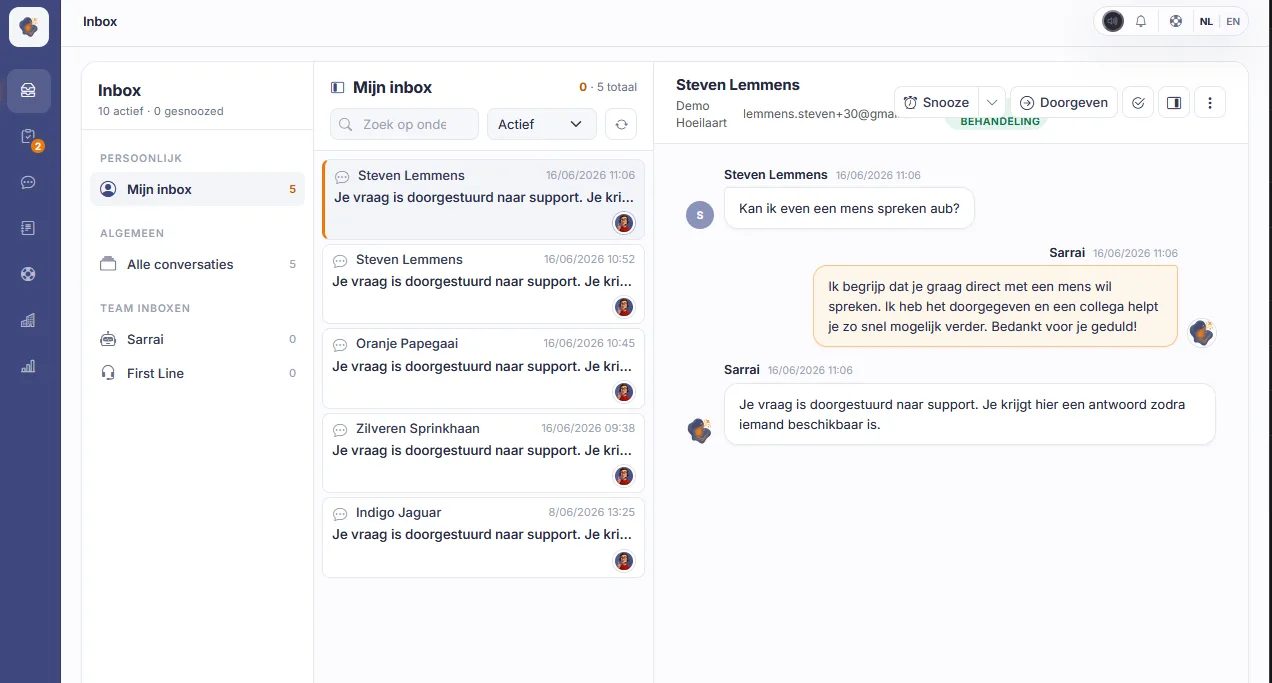
Chat conversations and emails sit side by side in the same list. Your colleague opens an email the same way as a chat conversation, with the conversation, the customer data and the reply field on one screen. Switching between your mailbox and a separate chat tool is a thing of the past.
Both channels draw on the same knowledge base. What your team writes there once, Sarrai uses for its answers in the chat and for its email drafts. Your customer gets the same answer, whichever way they reach you.
In the chat, the AI agent answers right away. When a customer would rather talk to a person, your team takes over the conversation, with everything that was already said.
You start with chat. An admin switches on the email channel in the Sarrai settings, whenever your team is ready. From then on, the emails to your support address arrive in the same inbox as your chat conversations.
When an email comes in, Sarrai looks for the answer in your knowledge base and writes a draft. The draft waits above the reply field, together with the sources it is based on. Your colleague reads it, inserts it with one click and edits whatever could be better. Sending is always their call. No email leaves before someone on your team has read it.
Every draft carries a label. "Grounded" means the draft is based on your knowledge base. "Uncertain" tells your colleague to give it a closer look.
Then Sarrai writes no draft. It tells your colleague that the question falls outside your knowledge base, and your colleague writes the answer. Your customer never gets an invented answer.
When your customer sends along a photo, an invoice or a log file, the attachment sits with their email and your colleague downloads it with one click. An email can carry up to 10 attachments, of up to 10 MB each.
When your customer replies to your email, the reply lands in the same conversation. If that conversation was already closed, it reopens in your inbox by itself. You read the whole thread from top to bottom, without searching.
You handle an email the same way as a chat conversation. Snooze it until later, close it when the customer is helped, or pass it on to a colleague or a team. Each team has its own inbox. When a colleague is already handling a conversation, you see their name and you know they are on it.
Your emails and the drafts from Sarrai also stay in the EU. Sarrai runs on European infrastructure and works only with European providers, also for the AI. Your data never goes to a service outside the EU.
An admin switches it on in the Sarrai settings. Until then, only chat conversations arrive in your inbox.
No. Sarrai writes a draft from your knowledge base. Your colleague reads it, edits whatever could be better and sends it.
For every email whose answer is in your knowledge base. When the question falls outside it, Sarrai writes no draft and your colleague writes the answer.
No. The attachments are for your colleague, who sees them with the email and downloads them. Sarrai does not use them for its draft.
The expert channel works in the chat only. For an email, your colleague reads the draft before it goes out.
Every guide tells you to start small. None of them tells you where. One simple test shows where AI pays off first in an SME: the question your team answers again and again.
Read moreSarrai now handles your support email too. The same inbox as your chat, an AI draft from your knowledge base, and a human who sends it. Fully on European soil.
Read moreTry Sarrai free for 30 days, and switch on the email channel when your team is ready. Or book a call, and we will look together at whether it fits your team.
