Insight into what kind of questions your customers ask
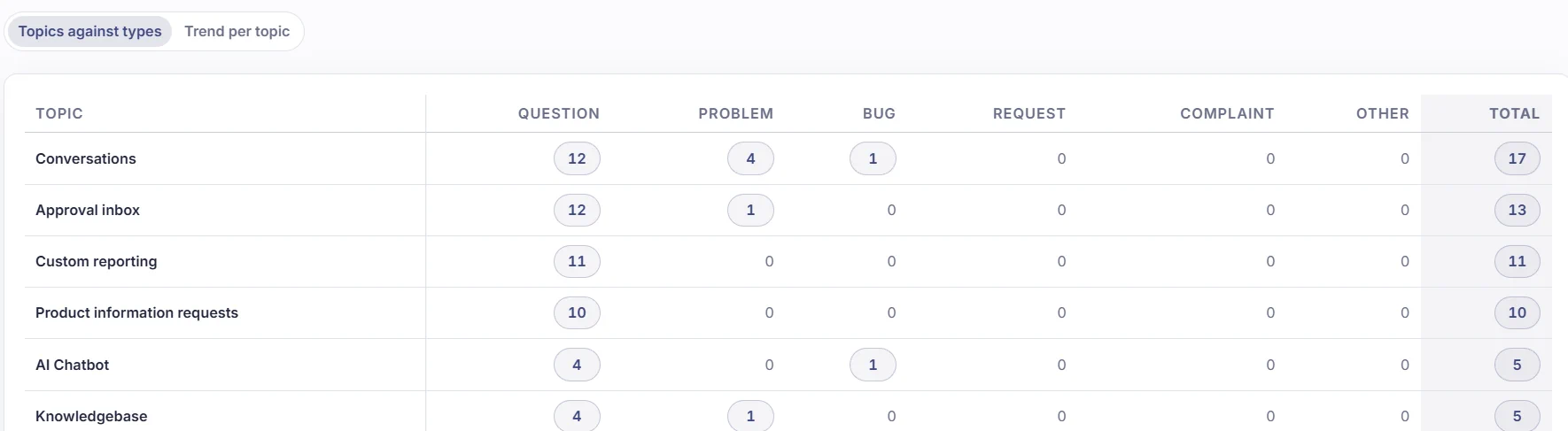
After a conversation is closed, Sarrai reads it back and records the topic and the question type. In the report, one table then shows you whether the conversations about invoicing, for example, are mostly questions about how it works, or whether they point to bugs.
Twenty questions about invoicing: who needs to act on them?
Every support tool can tell you that you had twenty conversations about invoicing this month. What you really want to know is what kind of conversations they were. So Sarrai also records the question type of every closed conversation: a question, a problem, a bug, a request or a complaint. Each type points to a different place in your company.
If they are twenty bugs, something in your invoicing is broken and you bring in a developer. An article will not fix that.
If it is the same question twenty times over, you are better off writing one good guide. In Sarrai, those questions already come back to you as a proposal in the approval inbox: approve it once, and the next customer gets the answer right away. The report shows you how many of those questions you get per topic, so you know where a new article pays off most.
A request goes to your roadmap. When ten customers ask for the same feature in one month, you want to know that before you plan the next sprint.
A problem and a complaint tell you where customers get stuck or are unhappy, even when nothing is technically broken. That is often the first place where you rewrite a process or a text.
This is how the report connects your numbers to your knowledge base and to your product planning. What your customers ask drives what you write and what you build.
What you see in the report
Your topics as rows, the question types as columns, with totals per row and per column.
Every number is clickable
It opens the conversations behind it, newest first, so you read straight away what was going on.
Trend per topic
A second tab shows day by day whether the invoicing bugs stopped after last week's update.
Mentions and conversations
One conversation can be about more than one thing. Sarrai counts each topic separately, with its own question type.
Sarrai works with your own list of topics
When Sarrai classifies a conversation, it always picks from the list of topics you manage. It never invents a topic of its own. So your report stays readable. Every row is a topic from your own list, with the name you gave it. Let an AI attach free labels and after a month you have a hundred labels that all differ slightly, and nobody reads that anymore.
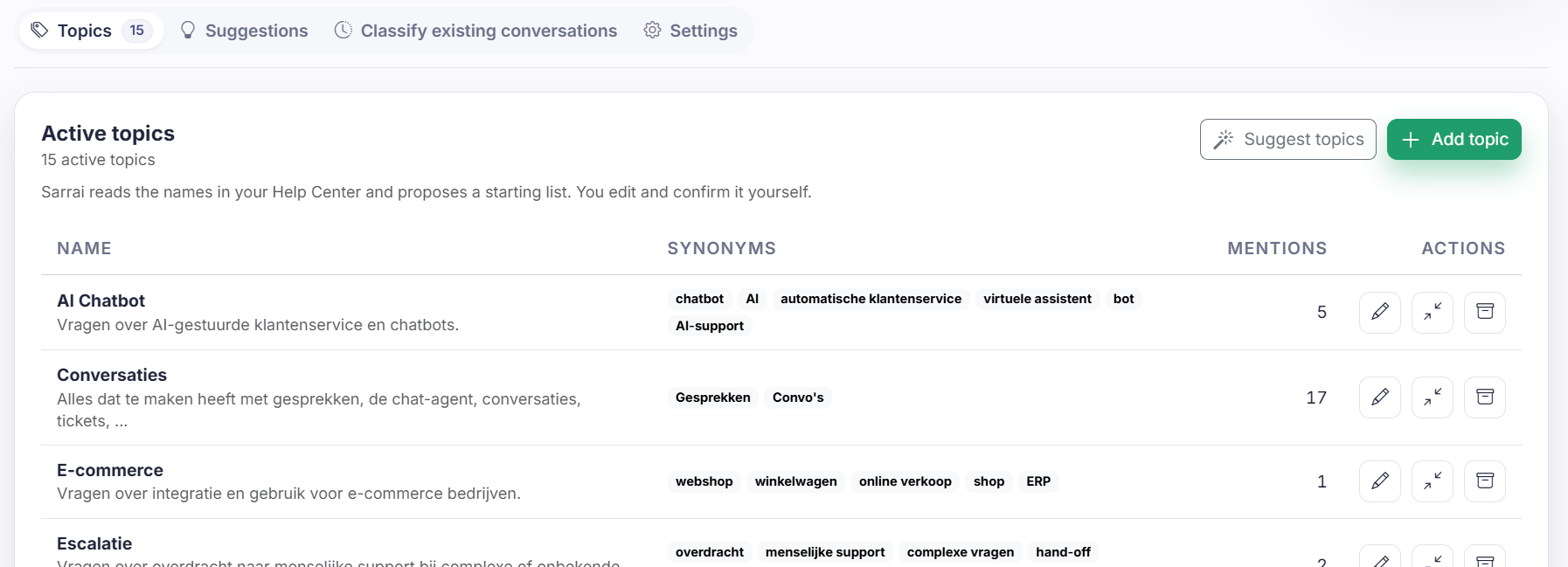
You do not have to come up with that list yourself. Sarrai reads the names of the collections and articles in your Help Center and proposes a starting list of ten to twenty-five topics, each with a description and the words your customers use for it. You edit, remove and approve.
After that, the list grows with your customers. Every week, Sarrai groups the conversations it could not place under a topic and proposes a new topic when there are enough similar ones. You approve the proposal, you attach it as a synonym to an existing topic, or you reject it. What ends up in your list is your call.
What Sarrai cannot place
When no topic fits a conversation, it lands on the row "Not classified". The question type is still there, so you still see whether it was about bugs or about requests.
When that row grows, your list is missing something. You add a topic or sharpen a description, and you let the conversations without a topic be classified again. That way your list gets a little better every month.
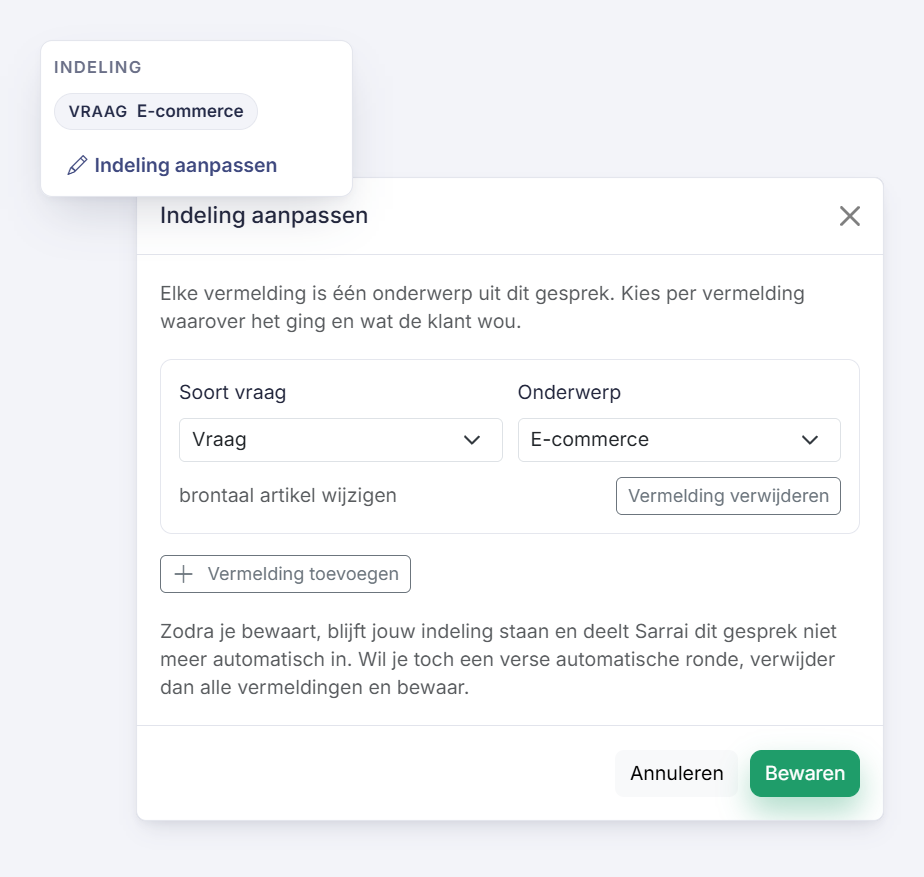
When an operator spots a conversation in the inbox that is filed wrong, they change the classification in the side panel. That correction stays, and it counts in the report like any other.
How this differs from other tools
Most support tools sort conversations by topic automatically, sometimes with sentiment or language added. That tells you what your customers write about. Whether it was a bug or a request is something you keep track of by hand, if someone remembers to.
In Sarrai, topic and question type sit next to each other in the same table, inside the product, with no add-on. And the topics come from your own list.
Frequently asked questions
Does Sarrai propose topics of its own?
Yes, and you approve them. At the start, Sarrai reads your Help Center and proposes a starting list. After that it proposes new topics from the conversations that come in, and across your whole history in one go if you want. No proposal lands in your list before you approve it. Until then, a conversation without a fitting topic stays on "Not classified" with only the question type.
How many topics do I need?
The starting list has ten to twenty-five topics, and for most companies that is enough. From around forty topics, Sarrai warns you, because you will not see a pattern in the table anymore. Rather than adding a variant next to an existing topic, add a synonym to it.
What if Sarrai files a conversation under the wrong topic?
An operator changes the classification in the side panel of the conversation. That correction stays. If the same mistake keeps coming back, you adjust the description or the synonyms of the topic. Sarrai reads those again every time it classifies a conversation.
Why is the total higher than my number of conversations?
One conversation can be about two or three things. Each of those counts as a mention with its own topic and question type. That is why the report shows both numbers: the mentions and the conversations behind them.
Is this a ticket taxonomy or ticket tagging?
It does the same job, with two differences. The list of topics is yours and stays short, because Sarrai never adds a topic without your approval. And every conversation also gets a question type, so you know what customers wanted, and you do not have to tag that by hand.
When does a conversation show up in the report?
As soon as it is closed. A conversation that Sarrai handled on its own closes after a day of silence. So today's numbers are always still incomplete.
Does the customer notice any of this?
No. The classification happens after the conversation is closed. No message goes out, and it changes nothing about the answers Sarrai gives.
Know where your budget should go
For each topic, you see whether you need a developer, a better article, or a spot on your roadmap. Try it with your own conversations.
More about the reports: Reporting in Sarrai
