How can I use AI in my SME?
Every guide tells you to start small. None of them tells you where. One simple test shows where AI pays off first in an SME: the question your team answers again and again.
Read moreSarrai answers most of your customers' questions on its own. When it is not sure of its answer, it asks a colleague first. While it waits, it stays in the conversation with the customer. When the customer wants to talk to a person, your team takes over the conversation, with everything that was said so far.

An AI agent is there to help your customer. It must not become a wall between your customer and your team. But some chatbots make it hard to reach a person. The customer keeps rephrasing the question and finds no way out. Then your company becomes harder to reach, when you used AI to become easier to reach.
The AI agent of Sarrai answers most questions on its own. When your customer still wants to talk to a person, they get one. The conversation goes to your team, and the customer stays in the same chat window. Your colleague sees at once what was said so far.
We designed the path to a person to be as short as possible. That is why a conversation can go to your team in three ways.
When the customer types that they want to talk to someone, Sarrai understands this and hands the conversation over. Plain language is enough. Sarrai tells the customer that a colleague will take over.
When the customer is clearly frustrated, Sarrai does not wait until they ask for a person. It hands the conversation over on its own.
Below an answer from Sarrai, the customer can mark the answer as not useful. The button "Talk to a person" then appears immediately. One click on it, and the conversation goes to your team.
A handed-over conversation waits in the inbox. Your colleague has everything on one screen:
You decide who gets a handed-over conversation: one colleague or a full team. If you set nobody, the conversation waits for the full team under "All conversations".
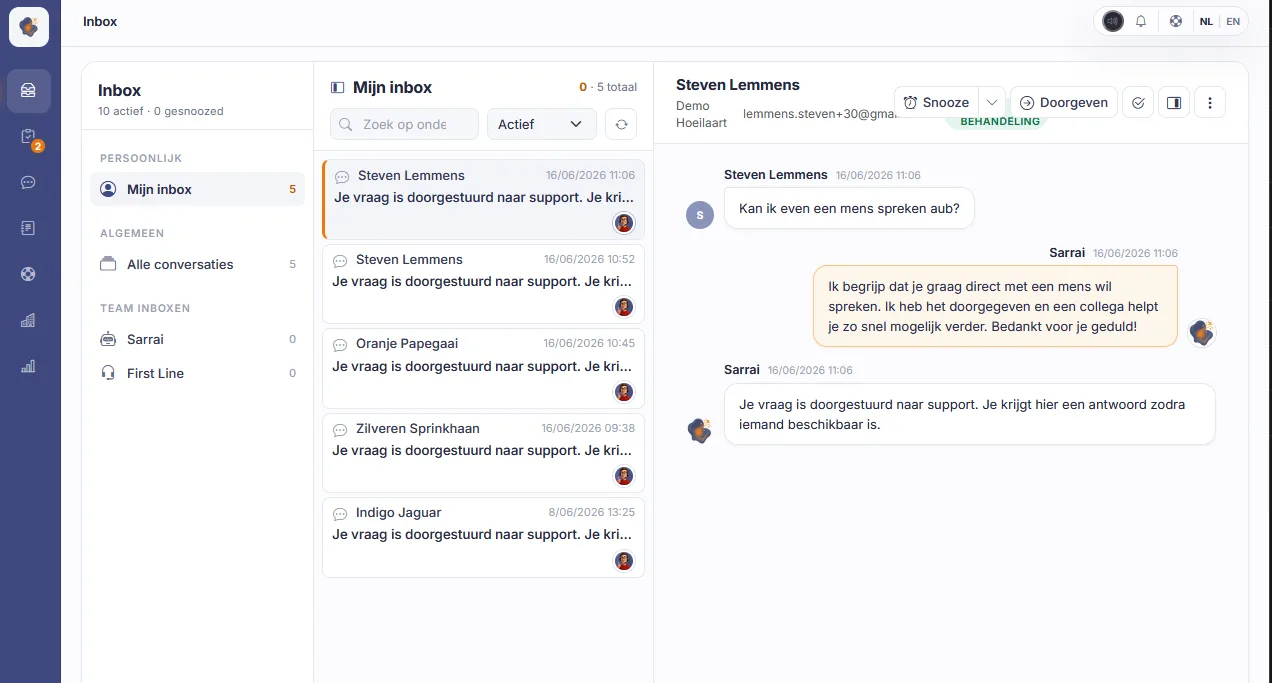
Does a customer write through the chat on your website, or send an email? For your team, there is no difference. When you switch on the email channel, every conversation comes into the same inbox. The conversations that Sarrai still handles on its own are there too. You can look at them without a change. When an answer can be better, your colleague replies. From that moment, the conversation belongs to your colleague, and Sarrai does not reply in it again.
Read how Sarrai handles support emailWhen a colleague already handles the conversation, you see their name, and your reply field is disabled. So you know at once that they work on it.
Your inbox works like a mailbox. You open a conversation, help the customer, and decide when it is done or when it can wait.
When a conversation cannot continue yet, you snooze it: from 15 minutes to next week, or to a time that you select. After that, it is back with your open conversations.
You close a conversation when it is done. When the customer sends another message after that, the conversation opens again in your inbox.
Next to your own inbox, each team has its own inbox. When a conversation is with a team, each team member can reply. When it is with nobody, the first colleague who replies takes it.
With Forward, you send a conversation to a colleague or to a team. When you send it to a colleague, they get a notification.
Not every question needs a full takeover. Often Sarrai only misses one piece of information that a colleague has. With the expert channel, Sarrai asks your team that question and stays in the conversation with the customer. Your colleague replies in a few words, and Sarrai makes a customer-friendly message from them. An admin switches on the expert channel in the chat settings.
When Sarrai finds something in your knowledge base that fits the question, but it is not sure of the answer, it asks a colleague. It tells the customer that it will check, and it continues to answer the other messages of the customer. Sarrai only asks during your opening hours, and only when a colleague has the status Available or Focus.
You make channels per topic, for example invoicing or delivery, each with a short description. Sarrai selects the channel that fits the question. When nobody in that channel is available, Sarrai skips it. All members of the channel see the question, and the first colleague who replies helps the customer. When a colleague edits the draft, the other members see their name next to the question.
The card of the question shows:
When the answer from Sarrai is correct, your colleague approves it. If not, they edit it, or they select "I don't know this".
Your colleague does not have to write a polished answer. Sarrai rewrites it in its own voice and sends it to the customer as a normal message. When your colleague makes a mistake, they can cancel the message within 15 seconds.
By default, the clock runs for 2 minutes. You set how long, up to 4 hours. When nobody replies in time, or your colleague selects "I don't know this", the customer gets a short message: a team member will pick up the conversation as soon as possible. The conversation goes to your inbox, to the colleague or team that you selected for this.
After your colleague answers, Sarrai makes a proposal for your knowledge base. You find it in your approval inbox. When you approve it, Sarrai answers the same question on its own next time.
No. When a colleague replies, the conversation belongs to your team. Sarrai does not reply in it again, also not when the conversation opens again later.
No. An admin switches it on in the chat settings. There, the admin also sets how long Sarrai waits for a colleague.
Then the clock runs out, by default after 2 minutes. Sarrai tells the customer that a team member will pick up the conversation, and the conversation goes to your inbox. So the customer does not wait for a colleague who does not reply.
No. Sarrai rewrites the answer from your colleague and sends it as its own message. The customer reads one continuous conversation.
The colleague or team that you set in the escalation settings. If you set nobody, the conversation goes to "All conversations", where every colleague sees it.
Every guide tells you to start small. None of them tells you where. One simple test shows where AI pays off first in an SME: the question your team answers again and again.
Read moreSarrai now handles your support email too. The same inbox as your chat, an AI draft from your knowledge base, and a human who sends it. Fully on European soil.
Read moreSarrai answers most questions on its own, and asks a colleague when it is not sure of its answer. When a person is necessary, your team takes over. Try it free for 30 days, or book a call and we will look together at whether it fits your team.
