Skip to content
Home Expert channel

Your experts type a few words. Your customer gets a complete answer.

When Sarrai isn't sure, it asks the right expert in the background. A reply like "yes, but only on annual plans" is enough. Sarrai turns it into a friendly, complete answer and sends it to your customer.

Prefer to work in the inbox? Type a few words there too. Sarrai writes a draft and you send it yourself.

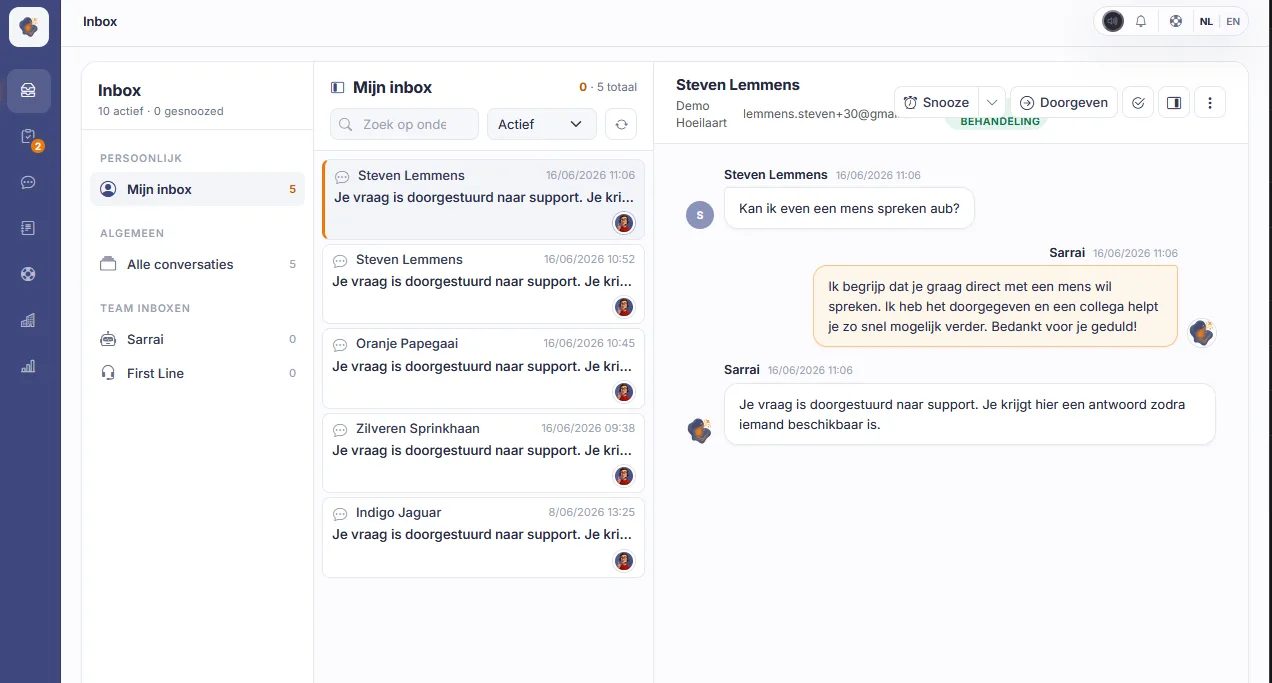
The Sarrai inbox with the personal inbox and the team inboxes on the left, the list of conversations in the middle and an open chat conversation on the right
Live in minutes
30 days free
Data stays in the EU

Sarrai asks your expert

Your developer knows the answers, but doesn't like talking to customers. They don't have to. Sarrai asks them the question in the expert channel and keeps handling the conversation with the customer, so your developer never has to take over.

Sarrai asks the right colleague

Create a channel per topic, such as "billing" or "integrations". Sarrai picks the channel that fits the customer's question and asks a colleague from that channel who is available right now (status Available or Focus). It only asks during your opening hours.

Your expert sees everything at a glance

Your expert gets the full conversation, a summary of the customer's question and the answer Sarrai drafted. If the answer is right, they approve it. If not, they type a few words of their own.

Sarrai writes the answer

Sarrai turns those few words into a complete answer and sends it as a normal message in the conversation. Made a mistake? Your expert can pull the message back within 15 seconds.

Your expert can't reply right now?

Sarrai waits 2 minutes by default, and you can set anything up to 4 hours. After that, the conversation is escalated automatically: it leaves the expert's inbox and lands in a support operator's inbox. The customer is told a team member will pick it up.

Sarrai can rewrite answers straight from the inbox too

Support operators can jot down an answer in shorthand, like "nope, can't do that", and click Send via Sarrai. The conversation leaves their list, so they move straight on to the next one. A few seconds later it's back at the top, with a friendly, complete draft in the composer. They read it and send it themselves. That's how they clear their inbox fast.

Sarrai never makes things up

Sarrai only works with what you wrote. It never adds prices, deadlines, links or promises of its own, not even from your knowledge base. If something is missing, it asks you one short question instead of writing a draft.

Your customer reads the reply in their own language, even if you type in another one.

Everyone sets their own default

Each support operator chooses in their profile whether Send via Sarrai is their default button: always rewrite, or only now and then. If it's your default, Ctrl+Enter (⌘⏎ on a Mac) uses it too.

Your knowledge base learns too

Sarrai also learns from the shorthand answers your experts give. It turns them into proposals for your knowledge base and puts them in your approval inbox. Approve a proposal, and next time Sarrai can answer that type of question on its own, without interrupting your expert.

Frequently asked questions

Is the expert channel activated automatically?

No. An admin switches it on in the chat settings and sets how long Sarrai waits for a colleague. Send via Sarrai works in the inbox right away, with no extra setup.

Does the customer see that a colleague helped?

Yes. Sarrai tells the customer it's checking with a colleague, then sends the answer as its own message in the same conversation. The customer never sees your shorthand.

Does Sarrai send anything on its own with Send via Sarrai?

No. You get a draft. If it's good as is, send it straight away. If you want, you can still add to it or correct it first. That way you stay in control.

Does the expert channel work for email as well?

No, because Sarrai doesn't ask experts questions in the background for email. An email always lands in the inbox, with a suggested answer attached. Send via Sarrai works there as before, so you can easily expand or reword your answer. Read more about the shared inbox.

How do rewrites count towards my monthly plan?

A rewrite doesn't count as a conversation or towards your limits.

Try the expert channel with your own team

Try Sarrai free for 30 days and switch on the expert channel when you're ready. Prefer to talk first? Book a call and we'll look together at whether it fits your team.